
Overview
Both self-managed and SIS-managed programs use the same invitation process to grant access to the DESSA x Move This World System. Program Administrators can add and send invitations directly to Site Leads and Educators. In addition, Site Leaders who have added Educators to the system can also send or resend invitations, making it easy for team members to gain access and get started.
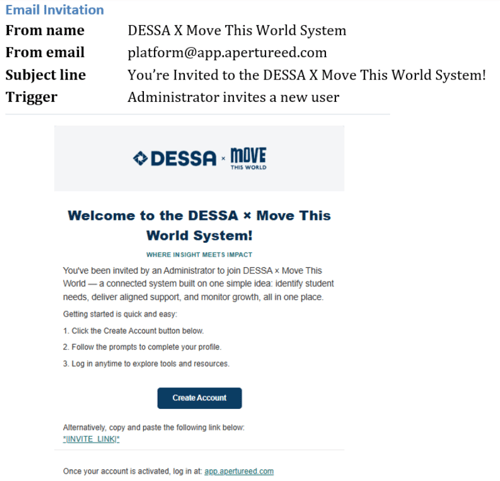
The invitation will come from platform@app.apertureed.com. An example of the email invitation is shown in Image 1.
Image 1
Sending Invitations (In Bulk)
- Select the gear icon in the top-right corner.
- Unable to Locate the Gear Icon? On smaller screens or at certain zoom levels, the gear icon may not appear in the upper-right corner of the application. To access Settings, click the hamburger menu (☰) in the upper-left corner and select Settings from the menu.
- Unable to Locate the Gear Icon? On smaller screens or at certain zoom levels, the gear icon may not appear in the upper-right corner of the application. To access Settings, click the hamburger menu (☰) in the upper-left corner and select Settings from the menu.
- Select Settings from the drop-down menu.
- Select Staff from the left-side menu.
- Select the Batch Invite button.
- In the pop-up window, select the role(s) and site(s) to receive invitations.
- Select Send Invites.
Sending Invitations (Individually)
- Select the gear icon in the top-right corner.
- Unable to Locate the Gear Icon? On smaller screens or at certain zoom levels, the gear icon may not appear in the upper-right corner of the application. To access Settings, click the hamburger menu (☰) in the upper-left corner and select Settings from the menu.
- Unable to Locate the Gear Icon? On smaller screens or at certain zoom levels, the gear icon may not appear in the upper-right corner of the application. To access Settings, click the hamburger menu (☰) in the upper-left corner and select Settings from the menu.
- Select Settings from the drop-down menu.
- Select Staff from the left-side menu.
- Search for the desired staff member.
- In the Status column, select Invite.
- Review the pop-up screen.
- When ready, select the Send Invite Now button.
📌NOTE: The user will receive an invitation at the email address associated with their account. If the user does not receive their invite, have them check their spam folder. Sending multiple invites will make previous invites expire.
DESSA x Move This World Automated Emails
The DESSA x Move This World System sends a small number of automated emails to keep users
informed throughout the school year — from account setup through rating completion and
results. This resource linked below lists each email, who it comes from, and when to expect it, so you can quickly confirm whether a message your users received is legitimate and expected.
All system emails are sent from: platform@app.apertureed.com unless otherwise noted
in the resource.