
Overview
Each Move This World course is organized into units and lessons. Understanding this structure helps you move through the curriculum efficiently and find the right content each week.
Getting started in your course
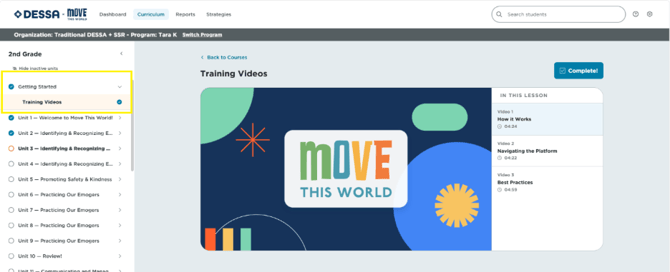
- The first time you open your course content, you'll be directed to the Getting Started unit.
- From here, select Training Videos to access three short (about 5-minute) training modules covering how Move This World works, how to navigate the platform, and facilitation best practices.
- Also within Getting Started, open the Materials folder to find the Common Language Posters and the Curriculum Guide for your grade-level course.
Image 1
Understanding units and lessons
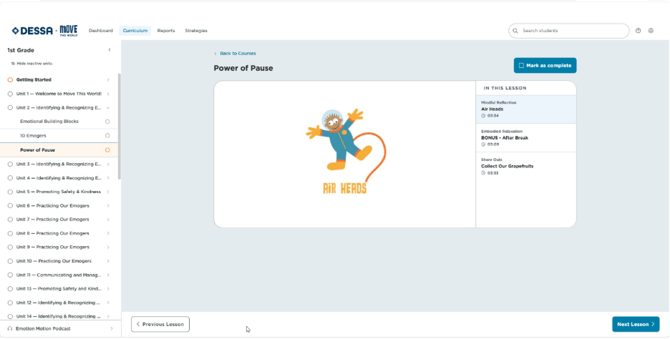
- Each course contains 36 units, with each unit designed to last one week.
- Each unit has a thematic title indicating the focus of that week's exercises.
- Each unit includes 2–3 exercises plus a Power of Pause folder.
- Select any lesson title within a unit to open it.
- A checkmark will appear automatically once a lesson has been reviewed, or you can select Mark as Complete to manually update your progress. For 5th-12th grade, if you are completing a Practice Your Path exercise, you will need to manually select “Mark as Complete” in order to receive credit for completing the lesson.
Image 2
📌Note: Every lesson includes a Video Exercise and a Facilitation Guide. For PreK–2nd grade courses, Emotion Motion Extension Opportunities may also appear within certain lessons.