Overview
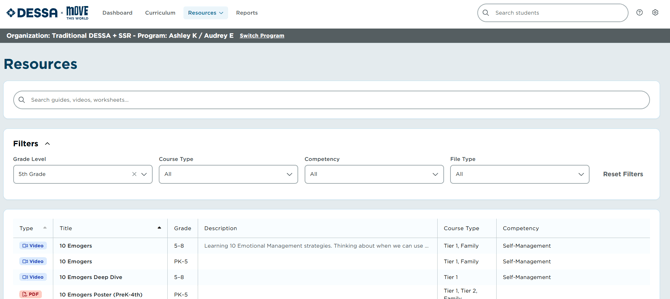
The Resources tab provides a collection of grade-level and implementation-specific tools, activities, and strategies designed to enhance and support your Move This World experience. These resources can be used alongside the Curriculum Courses to deepen instruction, reinforce key social-emotional learning concepts, provide additional practice opportunities, and address the unique needs of students, staff, and families.
To help you quickly find the most relevant materials, the Resources tab includes a variety of filters that allow you to sort and refine content based on your needs. Whether you're looking for Tier 1 classroom supports, Tier 2 intervention resources, family engagement materials, or implementation tools, the filters make it easy to locate each resource.
Accessing the Resources
- From the Dashboard, select the Resources tab at the top of the screen to the right of Ratings.
- If the Resources tab is not showing at the top on your screen, click the Hamburger Menu (≡) on the left.
- Next, click Resources, then select a grade level from the dropdown menu to filter and display the results.
- Use the Course Type (Tier 1, Tier 2, or Family), Competency, and File Type filters to narrow down your results further.
📌Note: If your program purchased Adult Wellness, those resources will also be available to select.
- Use the Course Type (Tier 1, Tier 2, or Family), Competency, and File Type filters to narrow down your results further.
- Click a resource's row in the table to open it.