Overview
Move This World Reports give Site Leaders and Program Administrators visibility into how classrooms and sites are engaging with the curriculum. These reports appear at the top of the Reports page, above the DESSA Reports.
📌Note: Move This World Reports are available to Site Leader and Program Administrator roles only.
Accessing Move This World Reports
- Select Reports in the top navigation.
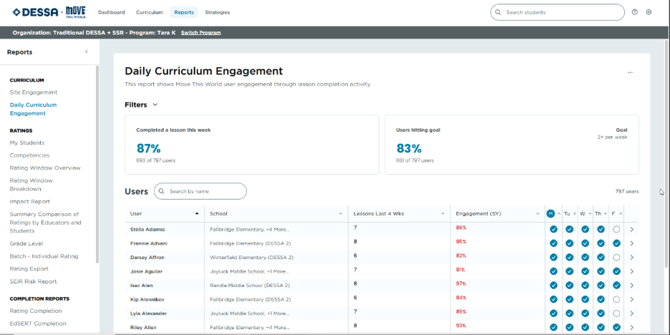
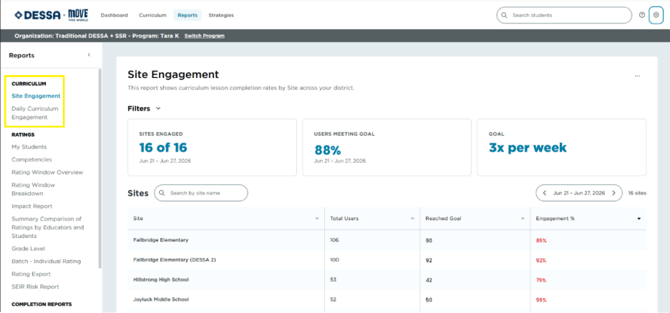
- The Curriculum Reports will appear at the top of the page, above the DESSA Ratings section. Currently, the two reports are the Site Engagement and Daily Curriculum Engagement Reports.
Understanding the Data
The metrics displayed in your reports help provide insight into user access and curriculum activity across your site(s).
Total Users includes all active users assigned to the selected site(s), including:
- Site Leaders
- Educators
- Training Only users
The Total Users metric reflects the total number of active users with access to the platform, regardless of their level of activity or engagement.
Engagement measures meaningful interaction with the curriculum. A user is considered engaged when they:
- Mark a lesson as complete
- Watch at least 60% of a video
- Open a PDF resource
📌Note: Activities within The Power of Pause are not included in engagement calculations.
Engagement metrics are designed to help you understand how users are interacting with curriculum content, beyond simply logging in to the platform.
Site Engagement Report
Shows overall Move This World participation across every classroom at a site, so Site Leaders can quickly see which classrooms are on track against the weekly goal set in Curriculum Settings.
- Filter by site, grade level, or classroom
- View completion rate against the configured weekly goal
Daily Curriculum Engagement Report
Breaks down Move This World engagement day by day, useful for spotting participation trends within a given week or rating window.
- View day-by-day session completion
- Compare engagement across multiple classrooms or sites