
Overview
Move This World Family Courses
Move This World provides engaging, video-based lessons that help educators deliver consistent social-emotional, behavioral, and mental wellness instruction. Through the Family platform, schools can extend learning beyond the classroom by giving families access to grade-level courses that support emotional development and well-being at home.
These short, interactive videos encourage families to participate in meaningful conversations and activities with their children, helping strengthen connections and build a supportive school community.
Video: Introducing Family Courses
Inviting Families to Access Family Courses
Before families can access Family Courses, they must be invited to join their school's DESSA x Move This World program. Families can create their own accounts using a unique access code, join link, or QR code provided by the school.
To invite families:
- Log in as a Program Administrator.
- Select the Settings (gear) icon.
- Click Settings.
- Select Curriculum Setup.
- Choose Family access.
- Copy the login information from the Family access page and share with families. There are three options for sharing the log in information:
- Share the login url (https://app.apertureed.com/join) + Access code
- Share the Join Link (this option will bring user to the login page and auto populate the Access Code)
- Share the QR code (this will bring user to the login page and auto populate the Access Code)
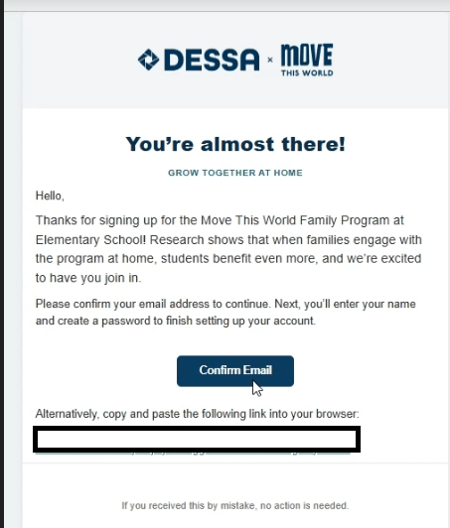
- Once the School Code is entered on the Join Your Family Program page, along with the email address, families will click Continue to generate an email to complete their registration.
Image 1
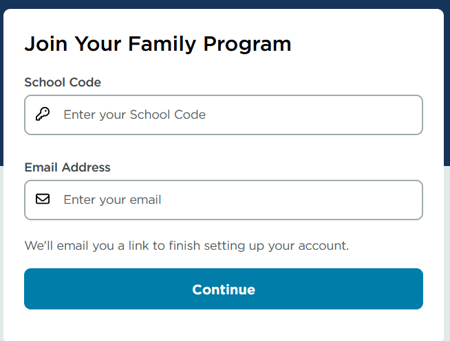
Image 2
Accessing Family Courses
- Log in to the DESSA x Move This World platform.
- From the top navigation menu, select Curriculum.
- If the top navigation menu is not visible, select the Menu (☰) icon and then choose Curriculum.
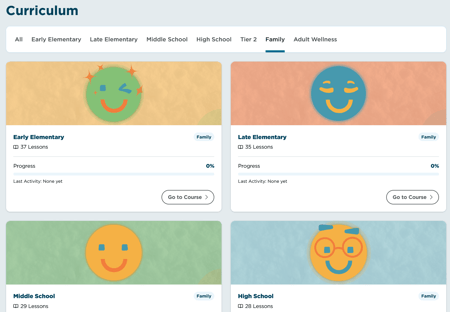
- On the Curriculum page, select the Family tab.
- Choose the appropriate Grade Level and Family Series.
- Begin exploring the available family courses and activities.
Image 3
📣Tip! Family courses are designed to be completed together, providing simple and engaging ways to practice social-emotional skills at home.
Downloads