How to Impersonate an Account
Here are the steps:
1. Log into the DESSA x Move This World System as you normally would (via email/password or SSO).
2. Click on gear icon in the upper right of the portal.
- Unable to Locate the Gear Icon? On smaller screens or at certain zoom levels, the gear icon may not appear in the upper-right corner of the application. To access Settings, click the hamburger menu (☰) in the upper-left corner and select Settings from the menu.
3. Select Settings.
4. Click on Staff on the right.
5. Search for the profile that you would like to impersonate (the account needs to be active in the system).
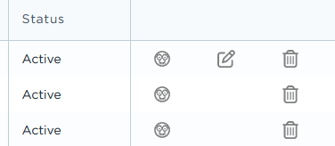
6. Click on the impersonate (face) icon to the right of the active status to view the account (see Image 1 below).
7. When finished, click on "Exit Current User" in the upper left and you will be redirected to the Staff page.
Image 1