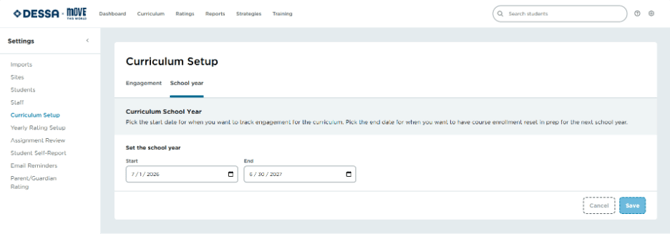
Overview
Curriculum Settings lets Program Administrators configure how Move This World content is delivered across the school year, including the weekly participation goal and the active date range.
Getting to Curriculum Settings
- Select the gear icon in the top-right corner.
- Unable to Locate the Gear Icon? On smaller screens or at certain zoom levels, the gear icon may not appear in the upper-right corner of the application. To access Settings, click the hamburger menu (☰) in the upper-left corner and select Settings from the menu.
- Select Settings in the top navigation.
- Select Curriculum Setup from the left-side menu.
Image 1
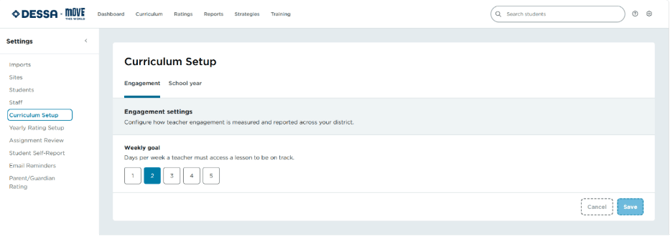
Setting a weekly goal
- From the Curriculum Setup page, locate the Weekly Goal field.
- Enter the number of Move This World sessions you'd like classrooms to complete each week.
- Select Save.
📌Note: The weekly goal is used to power the Daily Curriculum Engagement Report, so set it before the school year begins for the most accurate reporting.
Choosing start and end dates for the school year
- From the Curriculum Setup page, locate the School Year Dates section (Image 2).
- Select the Start Date for when Move This World content should become available.
- Select the End Date for when the curriculum window should close.
- Select Save.
Image 2