
Overview
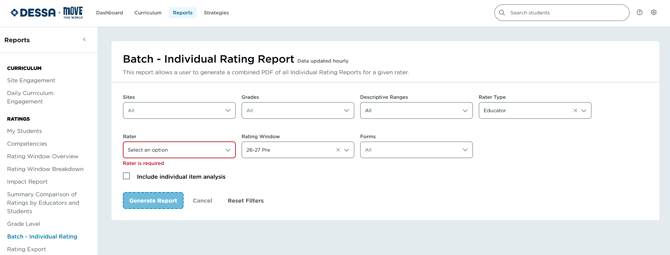
The Batch - Individual Rating Report allows a user to generate a PDF report for a selected Rater that includes all students for the selected criteria’s Individual Rating Report at once.
To access the Batch – Individual Rating
1. From the Reports menu select Batch – Individual Rating from the Reports menu on the left.
2. Select the Rater Type (Educator or Student Self-Report).
3. Select the Rating Window.
4. Select the desired Forms.
Note: For the Full DESSA forms, you can select the checkbox to include the individual item analysis.
5. Click Generate Report on the lower right of the screen.
📌Note: The report will load in a new tab, and from there you can print using the blue Print button in the upper right.
Image 1
📌Note: This report will be generated as a PDF, and may be saved in your downloads. Information about this report can also be found in our Reports Guide.