Overview
The DESSA System includes Foundational Practices, a collection of classroom routines and best practices that help establish a positive, supportive learning environment. It also offers Strategies, which provide educators with practical, actionable resources to strengthen students' social and emotional competencies.
For students who require more targeted support, the system includes Tier 2 Intervention Programs. These five multi-week programs are designed for small-group instruction and focus on intensive skill development in key DESSA competencies.
This article explains how to access and use these instructional resources within the DESSA x Move This World System.
Organization of Instructional Resources
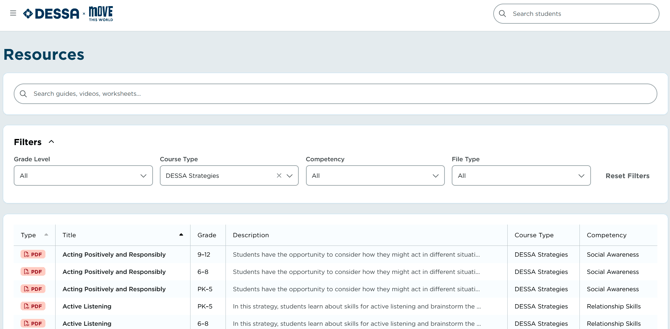
All instructional resources are located within the Resources tab of the DESSA x Move This World System. Resources are organized into three course categories:
- DESSA Strategies
- Second Step Edition
- Foundational Practices
To help educators quickly find relevant materials, resources can be filtered by:
- Grade Level
- Course Type
- Competency
- File Type
DESSA Strategies
DESSA Strategies are also organized according to the core competencies assessed by the DESSA framework, including:
- Optimistic Thinking
- Self-Awareness
- Self-Management (including Goal-Directed Behavior)
- Social Awareness
- Relationship Skills
- Responsible Decision Making (includes Personal Responsibility and Decision Making)
Accessing Strategies
- From the Dashboard, select the Resources tab at the top of the screen to the right of Ratings.
- If the Resources tab is not showing at the top on your screen, click the Hamburger Menu ≡ on the left.
- Next, select a grade level from the dropdown menu to filter and display the results.
- Use the Course Type (DESSA Strategies, Foundational Practices, Second Step Edition), Competency, and File Type filters to narrow the results further.
- Click a resource's row in the table to open it.
- To access DESSA Tier 2 courses in Thinkific, select File Type: Link