Overview
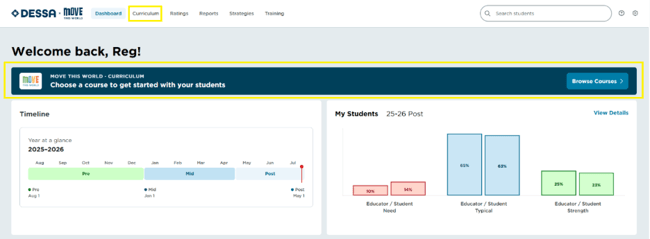
Move This World (MTW) is available to programs with the curriculum product enabled. Once enabled for your organization, MTW can be reached two ways: directly from the Dashboard, or from the dedicated Curriculum tab in the top navigation.
Accessing Move This World from the Dashboard
- Sign in to the DESSA x Move This World System.
- On your Dashboard, locate the Move This World section at the top of the page.
- On smaller screens or at certain zoom levels, the Dashboard tab may not appear in the top navigation. To access Dashboard, click the hamburger menu (☰) in the upper-left corner and select Dashboard from the menu.
- Select Move This World to launch directly into the curriculum experience.
Accessing Move This World from the Curriculum tab
- Sign in to the DESSA x Move This World System.
- Select the Curriculum tab, located in the top navigation next to Dashboard (see Image 1)
- On smaller screens or at certain zoom levels, the Curriculum tab may not appear in the top navigation. To access the Curriculum library, click the hamburger menu (☰) in the upper-left corner and select Curriculum from the menu.
- Select Move This World to open the curriculum library.
📌Note: The Curriculum tab and Dashboard module only appear for organizations with Move This World enabled. If you don't see either, contact your Program Administrator to confirm the product is active for your site.
Image 1